Poolside WHOOP Display
October 2026 – present
The problem
I have been a swimmer for over 10 years now. A big part of my training as a distance freestyler is ensuring I'm in the right heart rate zones.
I wear a WHOOP, which measures all of this properly, but the strap has no screen. Everything it knows sits in an app on a phone in my bag. This data would be super useful if I could have it handy ready to view in real time.
Right now, I check my heart rate pressing 2 fingers against my neck which leads to a lot of human error and inaccurate readings.
What is it?
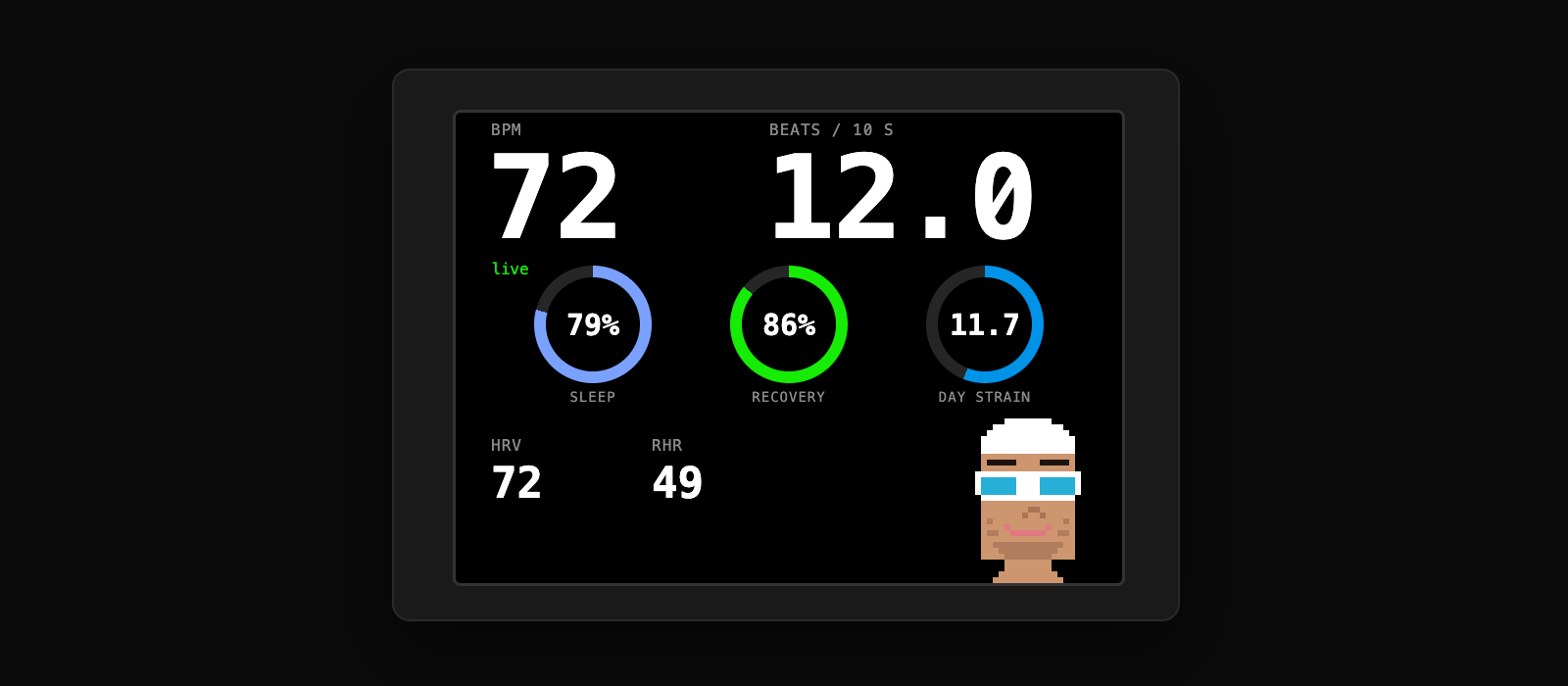
A box at the end of my lane that shows my heart rate, zones and WHOOP recovery numbers, big enough to read from the water. Inside is an Arduino UNO Q. It connects to the strap over Bluetooth, pulls recovery, sleep and strain from WHOOP's API over my phone's hotspot, and drives a 3.2" screen. It runs off a power bank and nothing else.
Why I built it
Mostly for my own training. I also wanted to know how quickly the WHOOP actually updates, which the app doesn't tell you, and the easiest way to find out was to put the raw readings on a screen next to a stopwatch. And it was a chance to build a whole product end to end: hardware, Bluetooth, an API, a screen and an enclosure.
Key Features
Live heart rate
Read off the strap over Bluetooth once a second. Big number, plus beats per 10 seconds, since that's what we count at the wall.
Activity mode
WHOOP doesn't say when a workout starts, so the box guesses from heart rate. A minute above 60% of my max and it switches to a zone bar with time in each zone, elapsed time and average. When I stop it shows a summary.
Recovery screen
Sleep, recovery and strain as rings, plus HRV and resting heart rate. There's a little pixel-art swimmer too. He looks happy when I'm green and rough when I'm red.
Standalone
Plug in a power bank and it boots, finds the strap, joins my phone's hotspot and has numbers up in about a minute.
Sealed enclosure
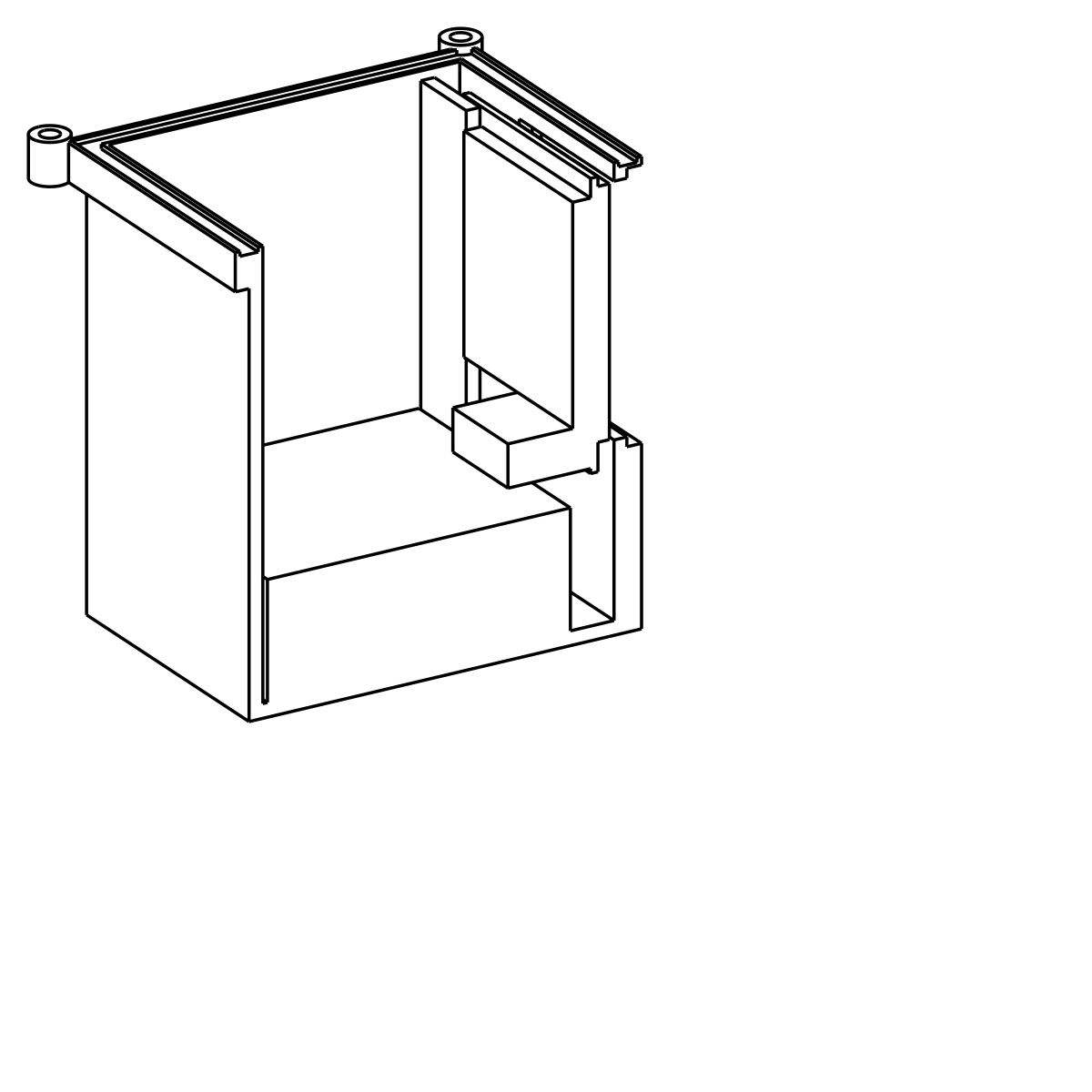
PETG box with an acrylic window in the front. The screen slides in from the top and the board hangs under a gasketed lid. Modelled in CadQuery, not printed yet.
Tested before trusted
The CAD script won't export if any parts overlap. 33 unit tests cover the parsing, the zones and the activity state machine.
Under the Hood
The parts that took a while.
Strap link
A Python service on the board's Linux side reads the strap's standard heart rate service through BlueZ. It has to run on the host because the app container can't see Bluetooth.
Two processors
Linux decides what to show and tracks zones. The microcontroller just draws what it's told, so the screen keeps updating even when Linux is busy.
Own TFT driver
The board can't pull libraries over USB, so I wrote the ILI9341 driver, a 5x7 font and the ring gauges myself. It only redraws what changed.
Detecting an activity
I started a workout in the WHOOP app and polled the API for a minute. Nothing came through. Workouts only show up after they're finished and scored. So the box watches heart rate instead, using WHOOP's zone cutoffs for my max of 202.
# No live "activity started" signal exists in WHOOP's API, so effort is the trigger.
ENTER_S, EXIT_S = 60.0, 300.0           # a minute in zone 2+, five minutes below 55 %

def zone_of(bpm, max_hr):               # WHOOP zones: 50/60/70/80/90 % of max
    return sum(1 for lower in zone_bounds(max_hr) if bpm >= lower)

# rest --(60 s >= 121 bpm)--> act --(300 s < 111 bpm, or strap lost 120 s)--> sum --(60 s)--> rest
When Bluetooth lied
Sixteen minutes into the first run the readings stopped, but BlueZ still said the strap was connected. Now a watchdog drops the link after 10 seconds of silence and reconnects.
# BlueZ can keep saying "connected" while the strap has gone silent.
# A watchdog drops the link after 10 s without a notification and reconnects.
def watchdog():
    if time.monotonic() - self._last_rx > STALL_S:
        log.warning("no heart rate for %.0fs while connected; reconnecting", STALL_S)
        self._loop.quit()          # session() returns -> Disconnect -> rescan -> Connect
        return False
    return True

GLib.timeout_add(1000, watchdog)
The box
The first version had the screen in a closed pocket behind a tower. It looked fine in the render, but there was no way to actually get the screen in, and the window ledge cut straight through a 3 mm wall. The second version is a plain box. The screen slides into a slot from the top with the lid off, and the front wall is thick enough to hold the acrylic. The whole model is one script, and it refuses to export if any parts collide.
Still to do
- Print the box, glue in the window, and dunk it in water before any electronics go in.
- Measure the real lag: sprint, stop, start a stopwatch, see how far behind the display is.
- Take it to practice and see what breaks.